Inventory & process improvement
When every minute counts on inventory day.
After the stock count, the stores had various difference lists available for checking. The information existed — but it was spread across three separate Excel files. Especially during the time-critical follow-up work on inventory day, that made a fast and targeted review more difficult.
With Inventory Day Analysis 4.4 I therefore developed an Excel macro solution that brought this information together into one central working basis.
Three lists. One task. Limited time.
Once the inventory data had been read in, stores could download three different Excel evaluations from the merchandise management system.
These included extensive lists on zero counts, zero stock levels and inventory differences.
Each of these lists contained important information for the subsequent check. For the practical work, however, it meant working with several files in parallel and bringing together relevant anomalies from different data sources.
On inventory day in particular, time is a decisive factor. So the question for me was:
How can the existing information be brought together so that stores can see more quickly where a check makes particular sense?
The data was not the problem. Its distribution was.
Each of the three existing evaluations served its own purpose. For a quick overall view, however, a shared working basis was missing.
Colleagues had to switch between several files, compare information and work out for themselves which differences should be checked first.
My approach was therefore not to generate more data. I wanted to structure the information that already existed so that it produced a working list that was as clear and easy to prioritise as possible.
Three files become one central analysis.
I developed the Excel macro file "Inventory Day Analysis 4.4" for this.
The three source lists generated by the merchandise management system could be imported into the areas provided for them in my file.
The data was then merged for further analysis. Duplicate entries could be cleaned up through the macro logic, so that one central working list with the relevant articles and differences was created.
Using the interface I built, users could then sort and filter this list for different checking situations.
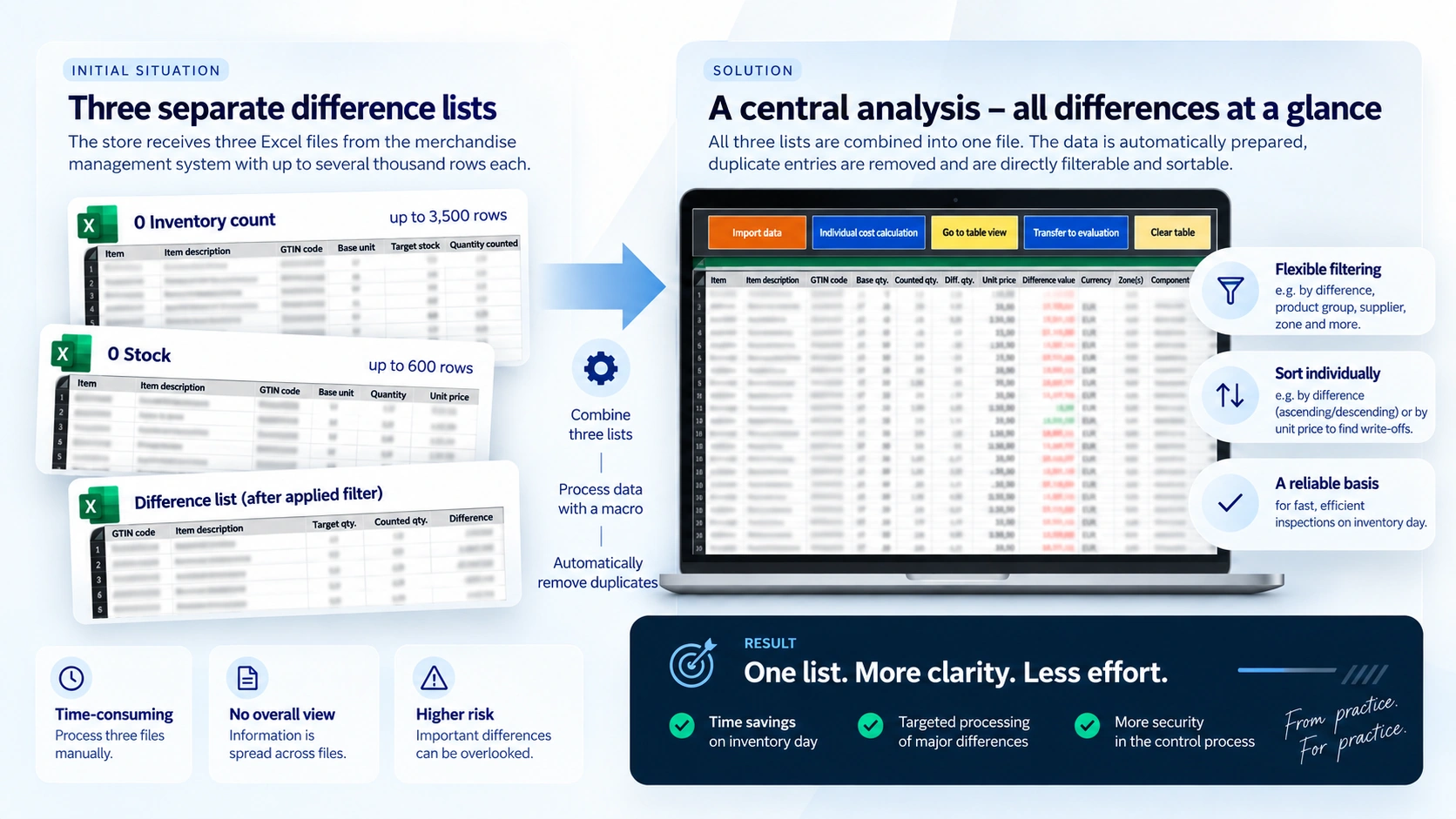
From three separate difference lists to one central working basis: a simplified illustration of the Inventory Day Analysis 4.4 workflow.
How the solution worked
- 1
Import the source lists
The three relevant Excel evaluations from the merchandise management system were imported into the designated areas of the analysis file.
- 2
Merge the data
The information was brought together within one central evaluation and duplicate entries were cleaned up through the prepared macro logic.
- 3
Prioritise differences
The resulting working list could, for example, be sorted by the size of the difference. This made it possible to focus specifically on particularly conspicuous deviations.
- 4
Check anomalies in a targeted way
Additional sorting and filters allowed further ways of checking — for example searching specifically for possible offsetting entries or related anomalies.
Prioritising instead of searching through lists.
A key advantage of the central evaluation was that differences no longer had to be viewed in isolation across several files.
The shared working list could be sorted by relevant criteria. Large differences could therefore be prioritised specifically.
Other sorting options could also help when looking into causes. Similar or related articles could be viewed directly beneath one another, for example, in order to spot possible offsetting entries or other anomalies more quickly.
The file was not meant to replace a professional check — it was meant to help users spend their limited time more purposefully on the relevant controls.
Fewer file switches. More focus on the check.
The practical benefit lay above all in bundling the information that already existed.
Instead of having to work on three separate files in parallel, stores had one central working basis for the inventory follow-up.
Based on my experience at the time and the feedback from various stores, the solution was perceived as a clear relief in daily work. The faster prioritisation of anomalies in particular supported a more efficient and more structured check on inventory day.
Overview
Bringing three separate source lists together into one central working basis.
Prioritisation
Sorting conspicuous differences specifically and prioritising them for checking.
Control
Focusing the available time more strongly on relevant deviations and possible causes.
A working aid from practice — for practice.
The Inventory Day Analysis grew out of a concrete challenge in the operational inventory process.
When it was in use, I received positive feedback on the application from various stores in Germany. The bundled view and the option to prioritise checks more specifically were seen as particularly helpful.
That feedback was especially valuable to me, because it was exactly the aim of the solution: not to create an additional process, but to support an existing process in a simpler and more efficient way for the people using it.
Why I still like this project today.
For me, the Inventory Day Analysis is a good example that process improvement does not always have to start with a new system or a large IT project.
Sometimes the improvement lies in bringing existing information together differently.
The three source lists were there. Excel was there. The professional checks were there.
I saw my task as connecting these building blocks so that stores ended up with a more practical working basis.
That is exactly the kind of challenge that still appeals to me today: understanding existing workflows, spotting unnecessary complexity and developing a solution from it that is genuinely usable in everyday work.
More case studies